I set out to build a proof of concept app using the web speech recognition API, and decided to test three different LLM coding agents head-to-head on the same task. What I found surprised me.
TLDR; Cursor CLI delivered a production-ready app immediately without any follow-up messages. Claude needed one fix but recovered well. Gemini struggled with basic setup and required manual intervention. The code quality differences matched the development experience, and I’m surprised Cursor’s Composer-1 isn’t included in more coding leaderboards.
The goal: dictate text into a markdown editor
This project started with me wanting to know more about current web speech recognition APIs. I thought it would be cool to be able to dictate text directly into a markdown document. Therefore I tested some coding agents to see how well they could build a first proof of concept using my favorite frontend technology: SvelteKit.
The prompt was straightforward: create a SvelteKit app that could write markdown in a text area using voice input via the web speech API. The agents I had easily available were Cursor CLI (using Composer-1), Claude, and Gemini CLI.
Note: My Gemini CLI had preview features disabled and used Gemini 2.x models. By the time I figured this out, I had burned through my quota and haven’t been able to redo the task with the newer 3.x models yet. This may have significantly impacted Gemini’s performance in this comparison.
1. Cursor CLI
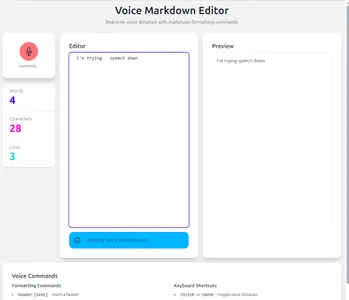 View Cursor result
Cursor generated a proof of concept app very quickly. After the initial prompt it actually worked immediately, no fixups or extra input from me needed. The UI also looked good to me, it’s pretty clean and it shows real-time transcription as you dictate. One minor flaw is that it renders the markdown but with the selected daisyUI theme, a <h1> tag is not styled so you can’t actually see the headings in the preview pane.
2. Claude
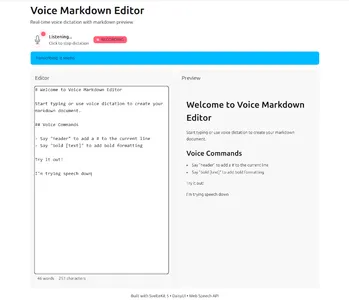 View Claude result
Claude was a bit slower to get going. After it was done generating its first version, there were some issues with the tailwind CSS integration, and I got a working, but completely unstyled app. I asked it to fix this and it managed to correct its own error. The end result worked well and the UI was also clean.
3. Gemini CLI
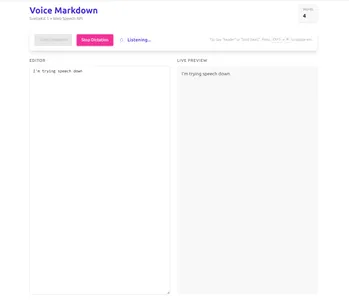 View Gemini result
Gemini was a bit of a mess compared to the other two. When it said it was done, I just got a bunch
of compile errors from Vite. It took more back-and-forths to get through those, (one even with Gemini
claiming I'm sure it'll work now., followed by I've made repeated errors, and I'm sorry. when I
pointed out that there were still compile errors).
When the dev server was finally up and running, I only saw the default Svelte (not SvelteKit) demo app.
I asked it to fix it but it couldn’t. I had to manually instruct it to download the SvelteKit starter
template and copy over the files that were needed.
It worked then but was very basic. It was also the only one that doesn’t show the transcription in real-time.
Technical Comparison by Claude
Once I had three working apps, I decided to use AI to compare the technical aspects of the codebases as well (I renamed them implementation 1, 2 and 3, just to make sure the LLM couldn’t easily slip some model preference in its judgement). I asked Claude to generate a report, including summarizing each codebase in one line. This is what it came up with:
- Cursor CLI → “Senior architect’s production-ready blueprint” — Built like it’s going straight to production with enterprise-grade patterns.
- Claude → “Mid-level developer’s solid MVP” — Ships features that work well without gold-plating.
- Gemini → “Weekend hacker’s ‘works on my machine’ special” — Built fast, works now, refactor later.
I think Claude judged the code pretty well and it perfectly matches my development experience. The full report is available in the GitHub repo.
Why this matters
Cursor CLI outperformed Claude and Gemini by a big margin in this test. This was surprising to me, I had expected them to be closer and for Claude to come out on top based on my recent experience with it. With this result it really surprises me that I rarely see Cursor’s Composer-1 model included in leaderboards like SWE-bench.
This also makes me think: is there something specific to my particular task? I have a number of thoughts as a result of this project:
- Svelte is not the most popular framework and models probably haven’t been trained on it as much as for instance on React. Does this mean that the future of coding agents will put strong pressure towards the most popular frameworks because those just work better?
- Or is the reason Svelte 5 is still pretty new and the distinction between pure Svelte and SvelteKit is a bit tricky? It seems both Claude and Gemini struggled with the setup of the project and at first tried to start from the pure svelte starter.
- How good is the ‘breadth’ of the existing agentic coding benchmarks? Now that I looked it up, I see that SWE-bench is focused on Python code. Additionally, my use case of building a completely new web app from scratch may be quite different from testing whether an agent can fix a bug in a (potentially huge) codebase.
 Discuss on Hacker News